RadTel RT-950 PRO Bluetooth Programming App
In my previous post, I complained about some people unfairly (in my opinion) criticizing this radio.
Now that I said that -- I am going to proceed to criticize the Bluetooth App. In my case, this is the Android version. (Note: All Android Phones and Tablets are Linuxslates).
Not only is it concerningly invasive, but it is very awkward to use and quite buggy, That said... It does work.
Before I get into the details of the BT App, I will say that work is underway to add support to the CHIRP Radio Programming software to add support for the RT-950 PRO. Given the popularity of the RT-950 PRO. CHIRP support should be forthcoming almost literally any day now. There are already some 3rd party CHIRP builds and add-ons for those willing to try.
The Bluetooth app (Called "walkie-talkie tool" , and seemingly from a 3rd party) has lots of functionality, and seems to support most of the myriad of features this radio has,
On start up, it requires you to create an account, and requires that you verify your email address. It also demands location service -- supposedly for the "nearby devices" functionality. Bluetooth pairing in the traditional sense is not needed or allowed.
It also has a few more annoying quirks. The app is not interactive with the radio. All settings/channels are read from or written to the radio each time.
When the RT-950 PRO is "programmed' the App seems to consistently time out at the 70% mark on it's progress bar. While this is disconcerting, it seems to complete the transfer, Additionally, the radio reboots after this, which means that Bluetooth is turned off. This means that if you wish to edit or add additional channels, you must start over completely in both the app and the radio. UPDATE: After several reads and write, it now seems that my BT Transfer is completing at 100%. Also, the second part can be mitigated by setting "Ble WR Switch" to on in the "Optional" tab, but then Bluetooth will of course remain on. (Why "Ble WR Switch" with the funky capitalization? What's wrong with just "Bluetooth" ?)
...But wait -- There's More -- Problems. If you leave the Channel or "Optional" (I think they mean Options) screens to go back to re-connect the BT, any changes are lost. It is imperative that you save your Channels and Options in a "Profile" before attempting to write to the radio or do anything else. Save like it's 1999. Also, there is no simple save function. Each save is essentially a save as..., and prompts you for a profile name. If the profile exists, it prompts you to overwrite it. This is the correct behavior, but it adds several steps to each save.
Note also that basically every setting is saved under "Optional" if you don't have these settings set the way you want them, all settings will be lost -- for example Programmable keys, PTT Buttons, and Push and Hold functions as well as things like Display and Menu timeouts.
There are also a few general glitches -- for example, in the settings for GPS Units -- The settings for Height (altitude) are Meters or Inches. Feet is not an option (it is in the Radio itself). I think inches is just the term they use for "Imperial". Maybe Imperial isn't politically correct these days. But to be honest, given how many functions there are, I'm actually impressed that there are not more issues such as I just illustrated.
Lastly, Once the radio is programmed in this manner, some settings are (correctly) locked out. For example, if you set a Channel to "No Transmit", there is no menu item in the radio to turn it back on. This makes sense as in a mass-deployment situation, we may not want users circumventing our channel lockouts, or accessing the FM Broadcast mode.
Additional Bugs and Comments (Updated as needed):
There are issues around the new NOAA Alert Function. First, it seems that if this is turned on, there are pauses in other functions such as scanning, and possibly just other reception. I believe that the radio (or at least one of ??? VFO's) must be periodically tuned to the set NOAA station to check for an Alert.
The Weather Alert function seems to causes significant issues with APRS. Once I set up and enabled APRS, the NOAA function would pop up, and I could not get it to go away long enough to turn off APRS, or do anything else. Switching to a NOAA frequency that as not active seemed to allow me enough time to get to the settings and turn off APRS after numerous tries. This does not seem to happen of NOAA Alert is turned off.
Note also that the NOAA Alert function is new, and is not included in the walkie-talkie tool app.
For now, I would recommend using the NOAA Alert function only if there is active weather expected or happening in your area, and not using APRS and NOAA Alert at the same time.
UPDATE 15 June 2026: Firmware V0.28 Seems to mostly or completely fix the NOAA Alert Function. Ref. Firmware V0.28 release note #1. I can confirm significant improvement in NOAA alert functionality; however, I still leave the NOAA Alert Function off unless I am expecting the possibility of significant weather in my area.
Added May 2026, FW 0.27: Probable Bug: In the APRS Beacon List, If GPS is on and has a valid fix, the RT-950 PRO calculates the distance to the beacon'ed position; however the units are "mp" (lower case as written). What exactly is an "mp"? The only unit of distance I found in a Google search was "MP- Mile Post". Do they assume we are hiking around Stonehenge, or someplace in the British countryside?
Some APRS beacons will crash or partially crash the radio (FW 0.27). After receiving an APRS beacon message, and getting the associated APRS pop up the radio becomes unresponsive, or partially unresponsive. Continued reception of signals on other VFO's may or may not work. Note: This seems to be a software crash, and thus may or may not be exploitable. While very remote (in both senses of the word), it is possible that a carefully formed APRS message could execute code in the radio. Work around is to turn off APRS.
Squelch Hysteresis issue: While listening to AM Aircraft Band in an RF Noisy environment (on airport property), I had to turn up the squelch significantly (8 or 9) to avoid constant noise. Upon reception of an actual transmission from the tower or an aircraft, the squelch would correctly be "broken" (overcome), and I would receive the transmission, however, at the conclusion of the transmission when the signal level returned to the lower background noise level, it was not silenced by the squelch. Momentarily selecting another channel using the encoder or Up, Down buttons, and then returning to the desired channel resulted in silence until the next transmission. It is unknown if this only affects AM. Note: RX Gain was set to AGC, and background noise level was about S5. Proper signals were S9+.
Official RadTel RT-950 PRO CPS (Customer Programming Software) on Linux with Wine.
I downloaded Radtel RT-950 PRO CPS Programming V1.3.0 260212 from the RadTel page, and installed it in my Wine Prefix. As I did with the Firmware installer, I verified COM33 was still associated with the Linux /dev/ttyUSB0, and selected it in the app. When I hit "Read", it got about 60% through and reported an error. No data was read into the CPS. I tried several times, and it always failed at exactly the same point.
Other users (on Actual Windows) reported similar issues. At this point I do not know if it is a Wine issue, or a RadTel RT-950 PRO CPS software issue.
UPDATE: Now Working. After doing a full Reset on the Radio, the Official RadTel RT-950 PRO CPS (Customer Programming Software) works on Linux with Wine. Please Reference the first post in this thread for the serial port setup. The issue was apparently corruption in the radio -- possibly due to the Bluetooth software.
I will also say that the RadTel RT-950 PRO CPS running under Wine works very well. I have "Round Tripped" (Meaning Editing Channels/Frequencies in the CPS, making changes on the radio itself, and then reading back into the CPS) multiple time, and there is no evidence of errors or corruption. I will also note that it is much easier to install the RadTel RT-950 PRO CPS on Wine/Linux than it is to do the required Python installation to get CHIRP working. Unless you use CHIRP for other radios, I recommend sticking with the RadTel RT-950 PRO CPS.
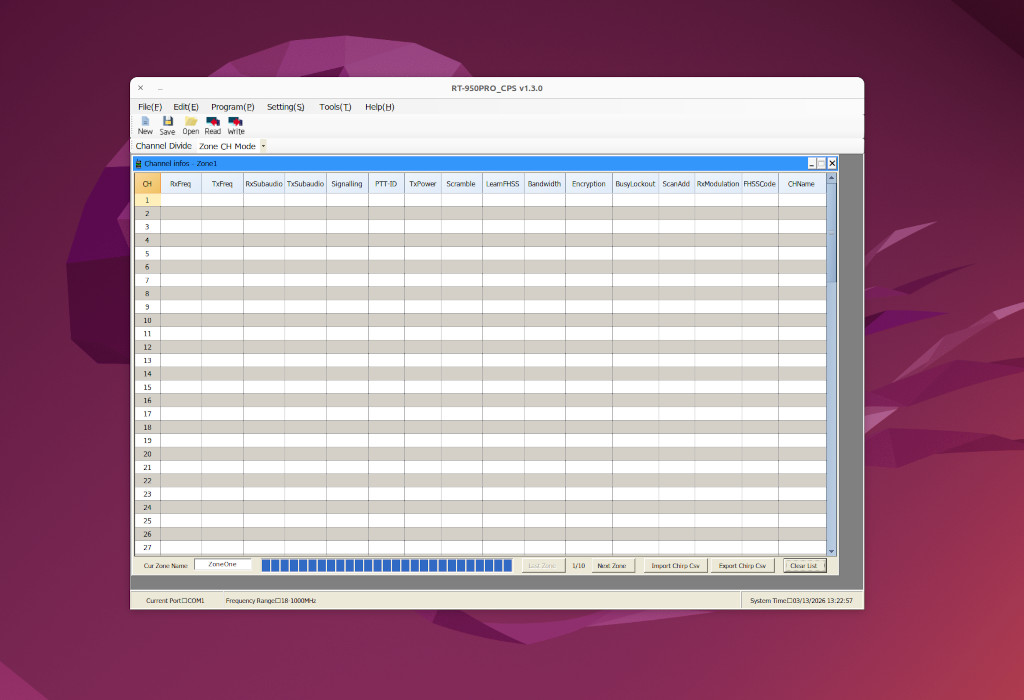
- Radtel RT-950 PRO CPS Programming V1.3.0 260212 Running On Wine/Linux
- Screenshot_20260305_3_sm_ed_pub.jpg (108.02 KiB) Viewed 884172 times
Note: If you get an Error on starting to write to the radio, simply try again.
Note: The Official RadTel RT-950 PRO CPS also seems to have a Boot Logo import function. Note that as of right now, there doesn't seem to be a consumer-friendly way to download the original boot image, so if you explore this feature, there is no way back except
possibly a full reset.
More Good News about the Radio Itself
Today, I learned I could put the radio in "FM Radio" Mode for LW/MW/SW/CB. In this mode (actually modes), the radio can tune from 2.3 - 30 MHz (and I think more to cover MW/LW). It is receive only, but it will receive AM, SSB, or CW, and it's good enough to tune WWV on at least 3 frequencies just from a VHF/UHF whip antenna (at different times of the day). I also tuned to some of my old "Sort of like CB" haunts, and it was great to hear traffic just like it was decades ago. I can't answer them on AM, but it's not totally impossible that there could be a hardware or software hack for this in the future. I was also able to copy several SSB DX QSO's on 40M.
Now I do understand some of the confusion that other sites are talking about. AM/FM/USB/LSB are not just modulation modes in this radio. They are separate bands, each with upper and lower frequency limits. This is pretty obvious for the FM broadcast band. Other modes in the FM Broadcast band wouldn't generally make sense, and having a separate group of "Favorites" totally does. In the case of AM SW and SSB, this is not as intuitively obvious because most SW/HF radios don't work this way, but once I figured out why changing the Modulation mode suddenly put me on a totally different frequency, getting to what I wanted to listen to (and saving some specific frequencies) was no problem.
Having all this in one handheld radio, and having it work from a whip antenna, is pretty amazing. Note: I was connected to an outdoor ground-plane when I was listening to 11M. Obviously, WWV and other SW reception was also much better when connected to a fixed exterior antenna.
NOTE: Going to FM Radio mode, and then selecting AM/LSB/USB/CW in the described manner also prevents accidentally transmitting with an antenna that does not work on these frequencies. Transmitting without a proper antenna for the band can very quickly damage a 10W radio.
Personal Note: I totally understand that listening to WWV in the modern world, especially on a radio that has will display the GPS time right on the top line, is a little nonsensical. I do it for nostalgic reasons, and a sort of quick propagation test.
What More Could I Ask For?
This radio already does a lot. What more could I possibly ask for? Well here are a few suggestions:
-- The PTT buttons are just basic PC mount switches, and as a result, are rather sensitive. I have to confess to kicking over the local repeaters on more that one occasion when I just meant to pick up the radio. This could be fixed in 2 ways -- A hardware mod to upgrade to "Clickier" (tactile) switches, or a firmware update to add "PTT Lock -- Key Lock -- Both" modes to the lock button.
-- OK, this one is more like a fantasy than a real firmware update request, but ADS-B decode would be nice. Maybe a Morse Code reader as a first step?