User Interface and Configuration:
So once I got the correct release firmware installed on my HelTec V4, I needed to configure it.
I would have thought that it would provide an SSID providing DHCP and a Webserver. Just connect, supply my WiFi information, reconnect, and navigate to the web interface -- Like -- You know -- almost
every piece of networking equipment made!(and many IOT devices) Even my
NODE MCU Clock works this way, and it runs on a far less powerful ESP8266.
 The Web Interface for my NODE MCU Clock provides a simple web interface for configuration -- all running on it's internal ESP8266. The fact that Meshtastic does not work the same way has been the biggest disappointment of my whole Mestastic journey.
Sadly, Meshtastic *is* running a Web server, it's just not usable directly from a browser as with many devices. I understand that the ESP32-S3, while night-and-day more powerful than an ESP8266, still has limited resources. But by keeping the web interface simple, and with a few clever compression techniques, I would think that it is still very doable. I'll also point out the functional and cool-looking web interface in ESP32 Launcher.
At this point, I could still have avoided proprietary software from Mountain View, California, but I decided to capitulate. I installed Google Chrome so that I could use the same USB connection to connect to my HelTec's Meshtastic Serial Port.
Another General UI Rant:
Before I get into specifics, and some workarounds, I have one more general complaint:
NOTE: A new version of the Meshtastic Android Client recently became available from the Google Play Store. This new version significantly improves the user interface in terms of both appearance and usability, and addresses some of the complaints listed below, however, others remain.
There is no consistency between the various user interfaces. This refers to appearance and type of widget for a specific function, nomenclature of a specific function, units, or allowable input parameters for a specific function. Since the functions are inconsistent among the Web Client, the Android Client App (I cannot check the iOS Client App), and the device firmware, the Web documentation can't possibly match all of them. In fact, the documentation often matches none of them. As can be seen in the Hardware Section, I had a totally unnecessary struggle with setting the battery voltage adjustment constant on the HelTec V4.
The Web Client calls the relative setting "ADC Multiplier Override ratio". The documentation calls it "ADC Multiplier Override" (without the un-capitalized "ratio"), and the Android Client calls it "ADC multiplier override" for a switch that is not present in the documentation, nor present in the Web Client), followed by "ADC multiplier override ratio" (In this case, no caps, except the Acronym) for the actual setting. Yes, the capitalization is a nit, and it's mostly consistent, but here's where it gets worse: I attempted to use the "ADC Calculator" in the documentation, but got values that produced useless results for the HelTec V4. Other users on Reddit and elsewhere also reported useless values when using the ADC Calculator. AI (Gemini) actual got the right answer -- Values close to 4.9, but the Web Client would not allow any value near 4. Also, the Web Client arbitrarily invalidates valid values. For example 1.1 or 1.11 is allowed, but 1.10 is not. Validating input is good, but let's at least follow elementary mathematics, and not invalidate the correct multiplier ratio factor parameter setting value thingy number.
Web Client units (time for example) are generally in seconds, and can be entered free-form (any number of seconds) whereas the Android Client has pull downs with e.g. 1 Minute, 2 Minutes, 5 Minutes...
Even worse is "Shutdown on power loss" !? (from the app) What does not shutdown on power loss? Apparently, this same setting is called "Shutdown on battery delay" "Automatically shutdown node after this long when on battery, 0 for indefinite", on the Web Client. This reads totally differently, but at least makes some sense. The documentation has the following heading and first line: "Shutdown after losing power" "Automatically shut down a device after a defined time period if power is lost." -- Again, it does not have any reference to a battery, or clarify internal or external power.
So I can figuratively hear the maintainers and developers saying "OK, Sure... We'll rewrite all of those tonight. Is 09:00 tomorrow OK to have this all fixed?" I'm not asking for that -- Instead, in a reasonable fashion, check the other UI's when related code is touched. Don't make it worse. If you are working on the menus in the firmwares, Look

at the relevant settings in Meshtastic-Andriod, and try to be consistent. If you think the other party is wrong, write an Issue. You are building a communications system. Maybe communicate some - Huh?
I also get that the firmwares are attempting to support many types of hardware -- some with extremely minimal user interface hardware. However, at least in the case of the LilyGo T-LoRa Pager, the on-board UI is unusable.
More UI and Client Issues -- No Particular Order.
Many, if not most, settings changes force an immediate and unannounced reboot. Note comment below about experience with using a mobile phone -- apparently the developers
are very familiar with Windows. It does not matter if the settings change is done from the Device UI, or from a Client interface.
LilyGo T-LoRa Pager with Firmware 2.7.19 (alpha) or 2.7.17 (release): Pressing any keyboard button wakes the unit from sleep, Changes to the message page, and begins a message. This means that this pocket-pager-sized unit cannot be put in a pocket or purse without significant likelihood of sending random messages. Today, I sent the letter "w" to the LongFast public chat. The other day, while attempting to get the encoder wheel working, I sent "Yes" from the Canned Messages to the LongFast open chat -- Embarrassing, and it could have been worse depending on what other messages were in the chat at the time. Ironically, one of the few buttons on the T-LoRa Pager that does *not* wake the unit from sleep is the power button. I really think that the Dev's must have never seen or used a mobile phone.
To this end -- and exemplary of the nonsensical locations of functions within the Android Client -- Why does enabling and using the encoder wheel require that Canned Messages to be turned on? Granted, there are some devices that have an encoder wheel (or can have an encoder attached), but have no QWERTY keyboard, in this case, it's obvious that the encoder wheel is used for the Canned Reply. However, especially in light of one -- at least relatively popular commercial device with both an encoder wheel and a QWERTY keyboard, the firmware should not arbitrarily connect the 2 features.
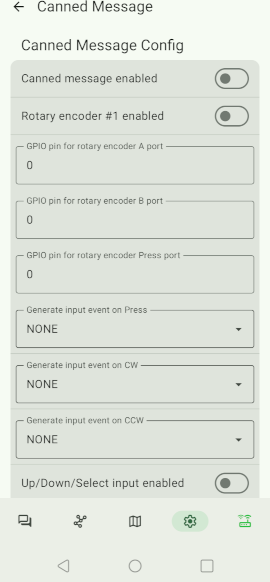
- Why are the Rotary Encoder settings dependent on the Canned Message feature.
- Screenshot_20260305_2_sm_ed_pub.png (41.5 KiB) Viewed 348314 times
NOTE: See Hardware section for more about the Rotary Encoder, and a workaround that allows the the encoder wheel to be at least partially usable.
Firmware Menus (on device) will close even while you are interacting with them. Some seem to time out on their own, but they will also (at least sometimes) close if you have the display set to "Carousel", and the display advances. As I type this, I have made several attempts to turn on Bluetooth from the device itself. Between the flaky encoder wheel, and the menus changing or disappearing, it has taken me several minutes to turn on Bluetooth.
Web Client fails to connect, or is extremely slow over WiFi: Ref Web-Client Issue #1015. Tried with both Firefox and Chrome. The following seems to help: Browse to https://(nodes local IP address)/ in a separate browser tab, and then go back to
https://client.meshtastic.org/, and attempt to connect again.
Web Client: Saving settings fails or is very slow for certain settings. Same settings/same device and network address will update normally from the Android Client.
LilyGo T-LoRa Pager with Firmware 2.7.19 (alpha): Nodes shown in the Device Node List page are completely different from those shown in the Client Node List. Why? Do I have something set wrong? Have unintended button presses blocked most Nodes? The problem persists after clearing the Node Database.
LilyGo T-LoRa Pager with Firmware 2.7.19 (alpha): Nodes in the "Bearings" page continue to show a direction (bearing) hours or days after the last heard time, or if GPS Compass is turned off on the observing node. There is no indication of "Staleness". Again, this could be very bad, even if it's just a lost or injured hiker. Data that is known to be invalid, or stale should not be displayed, or should be flagged as such.
HelTec V4 Settings to Reduce Power Consumption: Numerous articles report on high power demand for the HelTec V4. With default Meshtastic settings, the HelTec V4 will drain even a large battery in a matter of hours.
My Setup: I am using a 3400 mAh LiPo battery that I salvaged from something long enough ago that I do not remember where it came from. While it is old, I believe that the original device it came from was pretty much new when the battery was salvaged. The battery is in good literal shape -- in other words, not puffy or damaged. Charging is provided by a 5W Solar Panel, that has it's own 5V converter. This is potentially (no pun intended) inefficient, because the converter may drop off line (no output) when there would otherwise be sufficient voltage to still charge the battery, however, the 5W panel should provide more than adequate charge in most conditions, and I did not want to break open the waterproof solar panel housing to bypass the converter.
Settings: Note: Values provided are as seen in the Android Client App -- As mentioned, Menu structure, Nomenclature, and units are not consistent between the Web Client and the Android Client. Settings not mentioned are left to defaults, or are changed, but not directly or significantly related to power consumption.
Radio Configuration --> LoRa --> Transmit Power -- Currently left at "30" (Omitting units since the app does not show units for this setting)
Device Configurations --> Options --> (Note: Aren't a lot of these "Options"?) Node Info Broadcast Interval 48 Hours (Yay for units!)
Device Configurations --> Hardware --> (There is a Device section under Hardware -- Sorry, there is just too much material here. I can't stop) LED Heartbeat - OFF
Device Configurations --> Device GPS --> GPS Mode (Physical Hardware) -- NOT_PRESENT
Device Configurations --> Power Config --> Enable power saving mode -- Off (Reference note about using the app. For a remotely administered node, will be accessing it from the app, so this must be left Off)
Device Configurations --> Power Config --> Shutdown on Power Loss -- Unset (Note: I still am not sure I fully understand this setting yet (see other comments). Setting it to e.g. 24 hours may help prevent continued drain on a depleted battery, but it may also cause the node to shutdown and require physical access to restart, or to not restart when the battery is charged again.)
Device Configurations --> Power Config --> ADC multiplier override -- On
Device Configurations --> Power Config --> ADC multiplier override ratio -- 4.92 (This is a guessed number that gave me "reasonable" values for my individual module *if* the battery is properly managed by the hardware -- i.e. 4.20 Volts when the battery "seems" to stop charging. It also makes it indicate external power (Plug Icon) at about the right time.) (UPDATE: Also verified with a DVM.)
Device Configurations --> Power Config --> ADC multiplier override --> Wait for Bluetooth duration -- 10 seconds (Note: Nonsensical hierarchy of items copied for consistency.)
Device Configurations --> Power Config --> ADC multiplier override --> Super deep sleep duration -- 1 hour (This seems to have made the most difference. I am not going to pretend that I understand the nomenclature for any of these.)
Device Configurations --> Power Config --> ADC multiplier override -- Minimum wake time -- 10 seconds (Same note as above.)
Device Configurations --> Display --> Advanced -- Screen on for -- 30 seconds (Can set shorter if the display will never be seen.)
Device Configurations --> Bluetooth --> Bluetooth Config (PLEASE -- Make it stop!) --> Bluetooth Enabled -- Off (Since the device will be in a tree outside, it will probably be out of convenient Bluetooth range. I will normally communicate with the node via WiFi.)
Let's just go for it!! Can we get a "Device Configurations --> Hardware --> Device Hardware --> Hardware Config --> Bluetooth Config --> Bluetooth Options --> Bluetooth Settings -->Bluetooth -->" Ahhhhh!!
With these settings, by HelTec V4 -- With the battery of questionable history will usually be at about 70% (used 30%) in test conditions by the time the sun comes up enough to start generating power on a clear morning. I will report back once I have the actually installed the node in a tree.
More Coming Soon
 .
.